< Go Back
Climate Town
About
Climate Town is a video game designed to be played on touch screens at a museum exhibit in Alberta, Canada. It was my first professional experience as a game developer. I was responsible for handling the programming tasks.
Project Info

Role: Game Programmer

Team Size: 7

Time Frame: 3 Months

Engine: Unity (C#)
Introduction
Climate Town is a video game designed to be played on enormous touch screens at Heritage Park's Innovation Crossing's Heated Histories: Alberta’s Energy Evolution exhibit. Players act as governors of a modern town with cars, citizens, stores, power stations and other buildings. The game focuses on two key stats: Goodwill (residents' support) and Carbon Footprint (pollution). The main goal is to change a polluting town into an eco-friendly place. Players have 100 days to improve the town; if Goodwill drops too low, they lose.
Key Game Mechanics:
Camera Movement: Players can navigate and explore the town from different angles.
Upgrade System: Players can purchase/sell upgrades that results in updates to object visuals, particle effects and HUD values.
Object Selection & UI Menus: Players can interact with game objects and open menus that display available upgrades.
Leaderboards: Players can compare their progress and achievements with others, adding a competitive element to the game.
Camera Movement
Unity's New Input System was utilized for camera movement. Climate Town supports touch, mouse, and keyboard inputs that can be used simultaneously. Here's a short overview of how it was made:
Action map was created to capture user inputs with a list of defined actions.
C# script was created to manage camera control coroutines through "performed" and "cancelled" action callbacks.
Camera control coroutines were developed to calculate movements based on input data from assigned actions:
Movement: Moves camera along the x and z axes based on touch/mouse position delta or WASD key presses.
Zooming: Shifts camera forward or backward based on touch distance, mouse wheel movement or RF key presses.
Rotation: Rotates camera around a "rotation sphere" by the "angle" between touches, mouse position delta while MOUSE3 is pressed or QE key presses.
Upgrade System
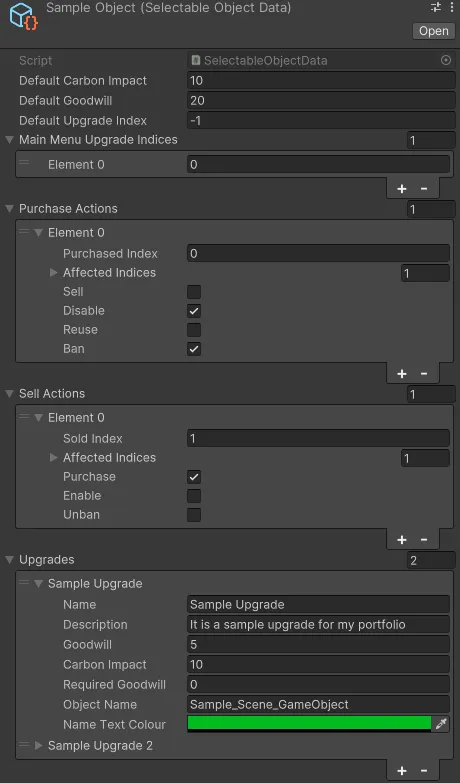
Climate Town features an intuitive upgrade system that is used to configure interactive objects. Scriptable Objects called Selectable Object Data are attached to every interactive object and include such properties as:
Default Carbon Impact and Goodwill that are added to the stat increment at the start of the game.
Default Upgrade Index that is purchased at the start of the game.
Main Menu Indices that are purchased during the Main Menu state of the game.
Lists of Sell and Purchase Actions with Sell, Disable, Ban and other actions that are applied to Affected Indices when an upgrade with a Purchased Index is bought.
List of Upgrades with Name, Description and other properties that store data of each available upgrade.
Object Selection & UI Menus
Climate Town allows users to interact with buildings, the environment and moving objects. Below is a brief overview of how it was created:
Each selectable object has a C# script that detects user input through OnMouseUp and OnMouseDown events.
Upon user interaction, a GameManager function is called that activates:
Highlight and Outline shaders.
Camera Transition method in CameraManager.
One of two UI menus in UIManager:
Upgrade Menu: A scrollable menu with a list of upgrades configured using Selectable Object Data (learn more in Upgrade System).
Power Grid Menu: A menu with sliders that are collectively totaling 100% and are used to adjust electricity production methods for a small Goodwill cost.
Leaderboards
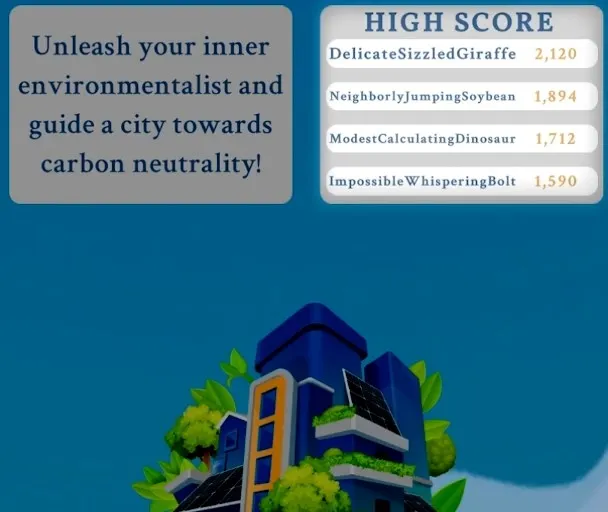
Top 4 Player Scores
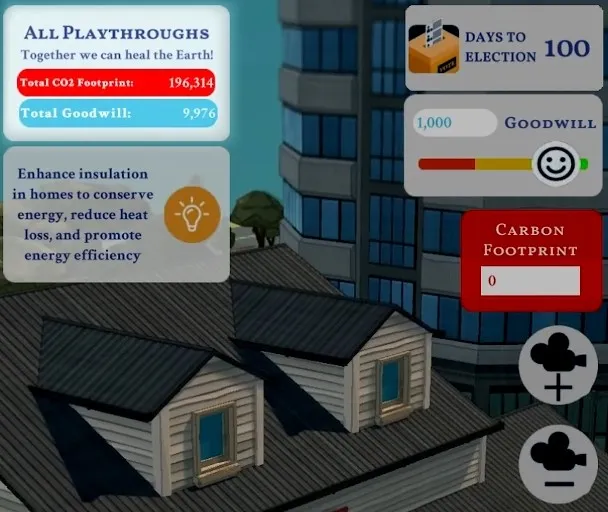
Total Carbon and Goodwill
Unity Leaderboards and Unity Authentication services were used to create web-based leaderboards. Here's a short breakdown of how it works:
At the start of each game, a new anonymous user and session token are created.
Current scores are retrieved from the web leaderboards and displayed in the corresponding UI elements.
Scores are saved and added to the web leaderboards when a player successfully completes a full 100 days of governing.
Climate Town has 3 active leaderboards:
Player Scores: This leaderboard stores individual scores and unique auto-generated names of each player.
Total Carbon: This leaderboard tracks the total CO2 Footprint across all successful playthroughs.
Total Goodwill: This leaderboard records the total Goodwill.